The disease level for a claim that is pending review or in Reviewed Deficient status can be upgraded by making the appropriate selection on the Disease tab:

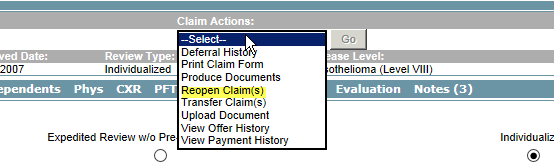
If the claim is in Deferred status it will need to be re-opened first (this is a choice under the Claims Actions drop-down):
If the claim is in Reviewed Qualified status, a temporary hold will need be to be applied (by Verus) to allow the claim to be edited. Please open a ticket to make this request.
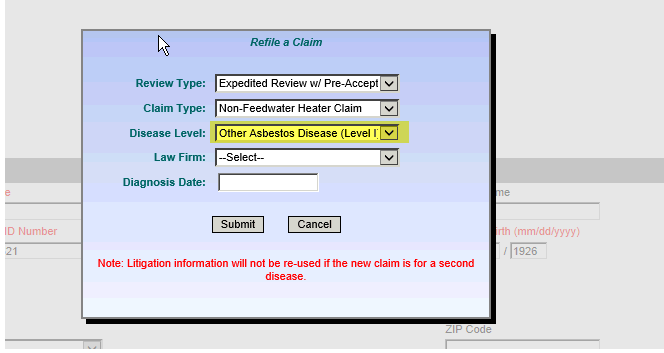
If the claim is in Withdrawn or Rejected status, the claim will need to be re-filed (also an option under Claim Actions) in order for any changes to be made and for the claim to be re-reviewed. Upon re-filing, you can make the appropriate disease level selection:
If the claim is in Withdrawn or Rejected status, the claim will need to be re-filed (also an option under Claim Actions) in order for any changes to be made and for the claim to be re-reviewed. Upon re-filing, you can make the appropriate disease level selection:
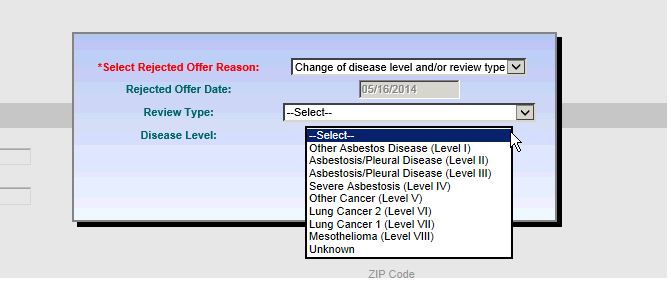
If the claim is in Offer Made status, the offer for the current disease level will need to be rejected by selecting “Reject offer” from the Claims Action drop-down. You will then be presented with a pop-up screen which will allow you to select the reason for rejecting the offer. On this same screen you can make the desired disease level selection: